Printers Monitoring
The Printers page shows the current status of the printers connected to SpoolEase. It is meant for quick monitoring: checking whether printers are connected, following active prints, viewing AMS slots, and sending basic print commands.
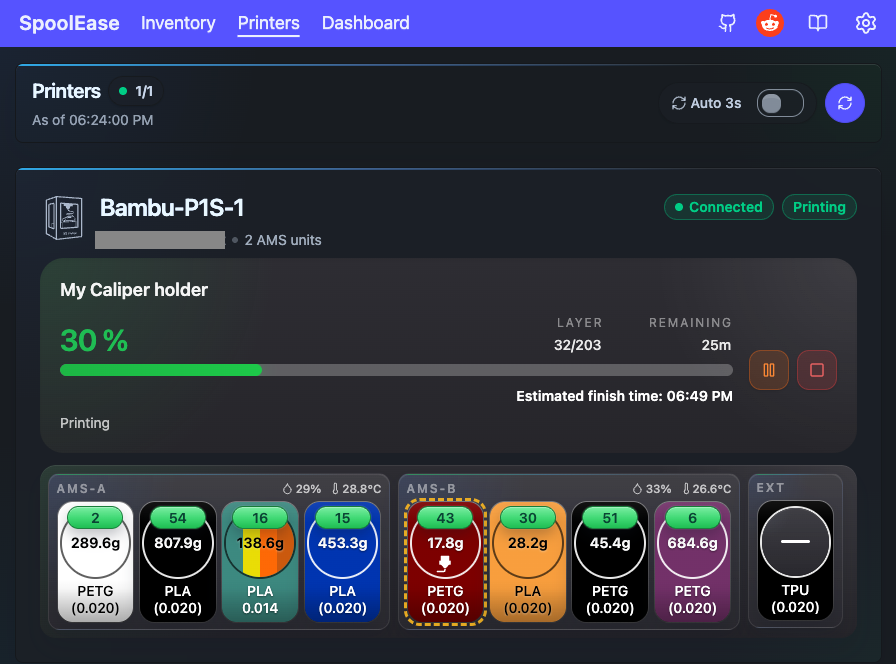
Printer Status Overview
The top of the page shows how many printers are connected out of the configured printers, and when the status was last updated.
Each printer card shows:
- Printer name and serial number
- Connection state
- Current print state
- Number of AMS units reported by the printer
Watching an Active Print
When a printer is printing, the card shows the active print information.
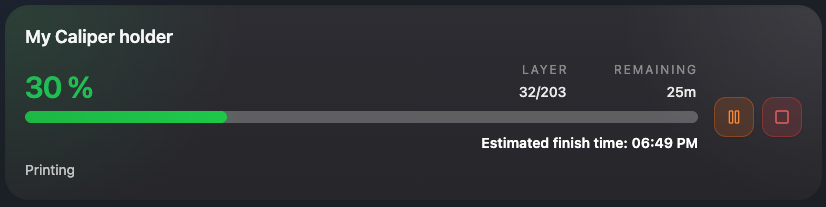
Depending on what the printer reports, you may see:
- Print name
- Progress percent
- Current layer and total layers
- Remaining time
- Estimated finish time
- Current print stage
Some values may show as N/A if the printer did not report them.
Pause, Resume, and Stop
For an active print, the printer card shows basic print controls:
- Pause pauses a running print.
- Resume continues a paused print.
- Stop stops the print.
SpoolEase asks for confirmation before sending these commands to the printer.
Stopping a print is normally not reversible. Use Stop only when you really want to cancel the print.
AMS and External Spool Slots
Below the print status, the page shows AMS and external spool slots reported by the printer.
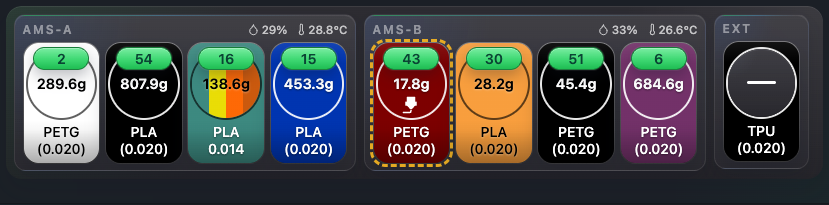
The slot display can show information such as:
- Material
- Color
- Spool ID
- Remaining or loaded weight when available
- K value when available
- Which slot is currently used by the print
For printers with multiple extruders, slots may be separated by extruder.
Temperature, Humidity, and Slot Details
AMS and slot groups can also show environmental information when the printer reports it:
- Temperature
- Humidity
Humidity may be shown as a percentage or as a droplet-style indicator, depending on the reported value.
Slot colors and spool colors may differ. When SpoolEase can match the loaded spool to an inventory record, it can use inventory spool information to make the slot display more useful.
Printer Errors and HMS Codes
If the printer reports a print error or HMS errors, the printer card shows a diagnostic area.
For reported error codes, you can:
- Copy the code
- Open the Bambu Lab wiki link for more information
The page does not try to explain every printer error. It gives you the code and a quick path to look it up.
Refresh and Auto Refresh
Use the refresh button to request the latest printer status manually.
You can also enable auto refresh. When auto refresh is enabled, the page periodically refreshes printer status and shows a countdown to the next refresh.
Multiple Printers
If more than one printer is configured, the page shows one card per printer.
This makes it useful as a quick status board for multiple printers, especially when some are printing and others are idle or disconnected.
For more about configuring several printers, see Multiple Printers.
Things to Keep in Mind
- The page depends on printer connectivity through the SpoolEase console.
- Some values are shown only if the printer reports them.
- Commands may take a short time to be reflected in the next status refresh.
- If a printer is disconnected, commands are disabled and monitoring data may be incomplete.
- Printer status is useful for monitoring, but the printer itself remains the final source of truth for safety-critical actions.